TL;DR — The Quick Answer
Symmetrical internet gives you equal upload and download speeds (like 500 Mbps both ways). Asymmetrical internet gives you fast downloads but much slower uploads — sometimes 10 to 25 times slower. If you work from home, make video calls, back up files to the cloud, stream, or create content, symmetrical speeds make a real difference. Fiber is still the most reliable way to get them in 2026, though new DOCSIS 4.0 cable plans are starting to close the gap in select markets. Not sure what’s available at your address? Call (855) 696-0156 for a free availability check.
Here’s something most internet providers won’t put in big bold letters on their pricing page: that “500 Mbps plan” you’re paying for might only give you 20 Mbps when you’re sending data instead of receiving it.
That’s not a glitch. It’s how asymmetrical internet works — and for decades, almost nobody noticed or cared. We downloaded movies, loaded web pages, and streamed Netflix. Data flowed one direction: toward us.
Then everything changed. Remote work, video calls, cloud backups, livestreaming, security cameras uploading footage 24/7 — suddenly the direction nobody thought about became the bottleneck everybody feels. That’s exactly why the symmetrical vs asymmetrical question matters more in 2026 than it ever has.
Let’s break down what these terms actually mean, why your connection probably favors downloads, and how to figure out which type you really need.
What Do Symmetrical and Asymmetrical Actually Mean?
The terms sound technical, but the concept is simple. Every internet connection moves data in two directions:
- Download speed — how fast data travels to you (streaming video, loading websites, downloading games)
- Upload speed — how fast data travels from you (sending emails with attachments, video calls, uploading to YouTube or Google Drive)
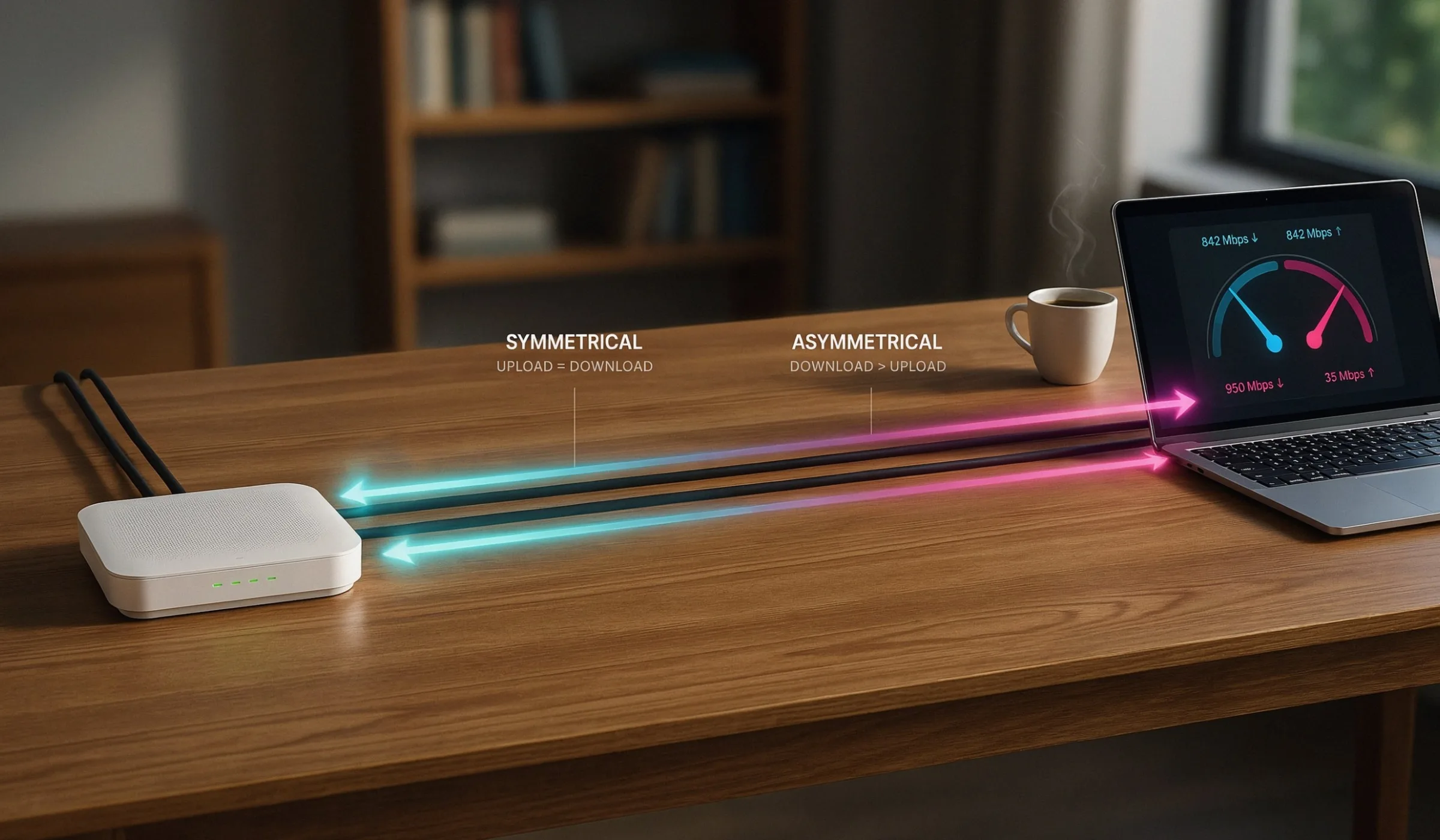
Symmetrical internet means both speeds are equal. A 1 Gig symmetrical fiber plan delivers roughly 1,000 Mbps down and 1,000 Mbps up. What you send moves just as fast as what you receive.
Asymmetrical internet means downloads are prioritized — usually heavily. A typical cable plan might offer 500 Mbps down but only 20 Mbps up. That’s a 25:1 ratio. Some older DSL connections are even more lopsided, with upload speeds in the single digits.
“Symmetrical” means same in both directions, like a mirror. “Asymmetrical” means uneven — fast in, slow out.
Symmetrical vs Asymmetrical: Side-by-Side Comparison
| Feature | Symmetrical Internet | Asymmetrical Internet |
|---|---|---|
| Upload vs download | Equal (e.g., 500/500 Mbps) | Uneven (e.g., 500/20 Mbps) |
| Common technology | Fiber-optic (FTTH), DOCSIS 4.0 cable | Cable (DOCSIS 3.0/3.1), DSL, satellite, most 5G home internet |
| Video calls & remote work | Excellent — smooth, stable | Fine for 1–2 users; struggles when several people call at once |
| Cloud backups & large uploads | Minutes, not hours | Can take hours for big files |
| Livestreaming / content creation | Built for it | Workable at low bitrates only |
| Typical price | Often the same or slightly more than cable | Usually cheaper, wider availability |
| Availability in 2026 | Growing fast, but still address-dependent | Available almost everywhere |
Why Is Most Internet Asymmetrical in the First Place?
This isn’t laziness on the part of providers — it’s history baked into the wires.
Cable internet runs over the same coaxial network originally built to deliver television. TV is a one-way broadcast medium, so when engineers added internet service to that infrastructure, they allocated most of the available spectrum to downstream traffic. That made perfect sense in 2005, when uploading meant attaching a photo to an email.
DSL has a similar story — the “A” in ADSL literally stands for “asymmetric.” Phone lines have limited capacity, and providers dedicated the bulk of it to downloads because that’s what customers used.
Fiber-optic networks were built differently from day one. Light traveling through glass strands has enormous capacity in both directions, so there was never a technical reason to throttle uploads. That’s why fiber is naturally symmetrical, while cable and DSL have to be re-engineered to get there.
DOCSIS 4.0: Cable’s Big Catch-Up Move
The cable industry knows uploads are its weak spot, and the fix is called DOCSIS 4.0. The new standard supports up to 10 Gbps downstream and 6 Gbps upstream — a massive jump from DOCSIS 3.1, which topped out at roughly 1.5 Gbps upstream in theory and far less in practice.
Comcast (Xfinity) is leading the rollout with multi-gig symmetrical “X-Class” plans in a growing list of markets, and Spectrum has been upgrading its network market by market with high-split architecture and DOCSIS 4.0. Retail DOCSIS 4.0 modems are finally reaching shelves in 2026, though most neighborhoods are still running on DOCSIS 3.1 equipment. You can read the technical details straight from CableLabs, the organization that develops the DOCSIS standard.
The honest takeaway: cable is closing the gap, but symmetrical cable is still the exception rather than the rule. If your address has fiber today, fiber remains the surer bet for equal speeds.
When Symmetrical Speeds Actually Matter
Let’s be honest — not everyone needs symmetrical internet. If your household mostly streams, browses, and scrolls, asymmetrical cable will serve you fine and probably costs less. Upload speed becomes critical in these situations:
Remote Work & Video Calls
Zoom, Teams, and Meet need 3–4 Mbps of upload per HD call. Two parents on calls plus a kid in virtual class can max out a 10–20 Mbps upload fast — that’s when video freezes while audio keeps going.
Cloud Backups & File Sharing
Backing up 100 GB of photos takes about 11 hours at 20 Mbps upload. On a 500 Mbps symmetrical line, it’s under 30 minutes. For photographers and video editors, this is the whole ballgame.
Gaming & Streaming to Twitch
Gaming itself uses little bandwidth, but low upload capacity causes latency spikes when the line is busy. Streaming gameplay at 1080p needs a steady 6+ Mbps upload on top of everything else.
Security Cameras & Smart Homes
Cloud-connected cameras upload continuously. Four cameras recording in HD can quietly eat 8–16 Mbps of upload around the clock — before you’ve even joined a video call.
Content Creation
Uploading a 10-minute 4K video to YouTube can take 2+ hours on slow upload plans. Creators on symmetrical fiber publish in minutes and iterate faster.
Busy Multi-User Households
Upload congestion affects everyone at once. When one person saturates the upstream channel, even downloads feel sluggish because acknowledgment packets get delayed.
when your upload channel gets saturated, your download performance suffers too. Your device has to send small confirmation signals back to the network for every chunk of data it receives. If those signals get stuck in upload traffic, the whole connection feels slow — a problem called bufferbloat.
Find Out If Fiber Is Available at Your Address
How to Check Whether Your Connection Is Symmetrical
You don’t need to call your provider to figure this out. Takes about two minutes:
- Run a speed test. Use a tool like Ookla’s Speedtest on a device connected by Ethernet if possible (Wi-Fi adds its own variables). Note both numbers.
- Compare upload to download. If your upload is within about 10–15% of your download, you’re on a symmetrical connection. If it’s a fraction — say 940 down and 35 up — you’re on asymmetrical service.
- Test at different times. Cable upload channels are shared with neighbors, so test in the evening too. A big drop during peak hours tells you the upstream is congested in your area.
- Check your plan details. Providers are required to publish upload speeds on their broadband labels, even if the marketing only shouts about downloads. It’s usually in the fine print of your plan page.
Worth knowing: the FCC raised its benchmark definition of broadband to 100 Mbps download / 20 Mbps upload, which tells you how much expectations have shifted. You can see the current standard on the FCC’s broadband measurement page. A 20 Mbps upload meets the federal minimum — but “minimum” and “comfortable for a modern household” are two very different things.
How Much Upload Speed Do You Really Need?
Rather than guessing, match your household to the closest profile below:
| Household Type | Minimum Upload | Symmetrical Needed? |
|---|---|---|
| 1–2 people; browsing, streaming, email | 10–20 Mbps | No — standard cable is fine |
| 1 remote worker with daily video calls | 25–50 Mbps | Helpful, not essential |
| 2+ remote workers / students on calls | 50–100 Mbps | Strongly recommended |
| Content creator, streamer, or photographer | 100+ Mbps | Yes |
| Smart home with cloud cameras + remote work | 100+ Mbps | Yes |
| Home business, large file transfers, servers | 250+ Mbps | Yes — fiber if available |
Which Providers Offer Symmetrical Speeds in 2026?
Here’s the honest landscape. Fiber providers — AT&T Fiber, Verizon Fios, Frontier Fiber, Google Fiber, Ziply, and hundreds of regional fiber companies — offer truly symmetrical plans as standard, typically from 300 Mbps up to 5+ Gbps both ways.
Cable providers like Xfinity, Spectrum, and Cox are mid-transition. Xfinity’s DOCSIS 4.0 markets now sell symmetrical multi-gig plans, while most of their footprints still run asymmetrical DOCSIS 3.1 with improved (but unequal) uploads.
5G home internet from T-Mobile and Verizon is asymmetrical — uploads usually land between 10 and 75 Mbps depending on signal and congestion. It’s a great value play, but not the answer if upload is your priority.
Availability comes down entirely to your address. These are the providers we help readers compare most often:
Is Symmetrical Internet Worth Paying More For?
Here’s the surprising part: it often doesn’t cost more. In areas where fiber competes with cable, symmetrical fiber plans are frequently priced at or below comparable cable tiers — providers use the symmetrical advantage as a selling point, not a premium add-on.
Where symmetrical service does cost extra (or requires jumping to a higher tier), ask yourself two questions. First, does anyone in your home regularly send large amounts of data — calls, uploads, backups, streams? Second, has your current connection ever felt fine for Netflix but terrible for Zoom? If the answer to either is yes, the upgrade pays for itself in saved frustration.
If your household is purely a consumption household — streaming, browsing, gaming without streaming — save your money. A solid asymmetrical plan with at least 20 Mbps upload will do the job, and you can revisit when fiber reaches your street.
The Bottom Line
The download number on the ad isn’t the whole story anymore. The way we use the internet has fundamentally changed — we’re all broadcasters now, sending video, files, and camera feeds upstream constantly. Asymmetrical connections were designed for a one-way internet that no longer exists.
If fiber is available at your address, symmetrical speeds are usually yours for the same money. If it isn’t, look at upload speeds — not just downloads — when comparing cable and 5G home plans, and keep an eye on DOCSIS 4.0 upgrades rolling into more markets through 2026.
Frequently Asked Questions
Mostly, but not exclusively anymore. Fiber-to-the-home is naturally symmetrical and remains the most reliable way to get equal speeds. However, DOCSIS 4.0 cable — currently rolling out in select Xfinity and other cable markets — can also deliver symmetrical multi-gig plans over existing coaxial lines. DSL, satellite, and 5G home internet remain asymmetrical.
Your connection almost certainly runs on cable or DSL infrastructure that was engineered to prioritize downloads. Most of the network’s capacity is allocated to downstream traffic because that’s what customers historically used. It’s a design decision in the network, not a problem with your equipment — though an outdated modem can make uploads even worse.
Yes. Symmetrical cable plans require DOCSIS 4.0-capable equipment, and in most cases right now that means using the gateway your provider supplies. Retail DOCSIS 4.0 modems are beginning to reach stores in 2026. An older DOCSIS 3.0 modem will bottleneck uploads no matter what plan you pay for.
Plan for 5 Mbps of upload per simultaneous HD video call, plus headroom for cloud syncing and other devices. One remote worker is usually comfortable at 25–50 Mbps upload. Two or more people on calls at the same time, or anyone sharing screens in high resolution, should aim for 50–100 Mbps — which is where symmetrical plans start making obvious sense.
Indirectly, yes. Games use very little bandwidth, but on asymmetrical connections a saturated upload channel causes latency spikes and bufferbloat — the lag you feel when someone else in the house starts a video call or backup. Symmetrical connections have enough upstream headroom that this rarely happens, so your ping stays stable.
No. T-Mobile and Verizon 5G home internet are asymmetrical — download speeds typically range from 100 to 400+ Mbps, while uploads usually fall between 10 and 75 Mbps depending on your signal strength and tower congestion. It’s excellent value for download-heavy households, but it’s not the right pick if uploads are your priority.
Not anytime soon, but the gap is shrinking. Fiber buildouts continue expanding, DOCSIS 4.0 is upgrading cable networks market by market, and the FCC’s broadband benchmark now requires at least 20 Mbps upload. Expect asymmetrical service to stick around for years in rural and satellite-served areas, while urban and suburban markets steadily shift toward symmetrical options.