
TL;DR — Quick Answer
Internet speeds have quietly entered a new era. Just a few years ago, a 1 Gig (1,000 Mbps) plan felt like the ceiling. Now fiber providers are selling 2, 5, and even 8 gigabit plans to regular homes — and the marketing makes it sound like you’re falling behind if you don’t grab one.
So let’s cut through the hype. This guide breaks down the best multi-gigabit plans you can actually buy in 2026, what they really cost, and — just as important — whether your household has any reason to pay for that much speed. Spoiler: most people don’t. But for the right home, multi-gig is a genuine upgrade.
What Counts as “Multi-Gig” Internet?
Multi-gigabit internet simply means any plan faster than one gigabit per second. So a 1 Gig plan is not multi-gig, but a 2 Gig plan is. From there it climbs to 5 Gig, 8 Gig, and a handful of providers are testing 10, 20, even 50 Gig tiers.
Here’s the part the ads skip: the technology behind the connection matters more than the number on the box.
Fiber uses a standard called XGS-PON that delivers up to 10 Gbps with matching upload and download speeds. A few providers like Ziply now use 25G-PON for even faster tiers. Cable (DOCSIS 4.0) is starting to offer multi-gig downloads, but uploads stay far slower. And 5G home internet tops out around 300 Mbps in real-world use — nowhere near multi-gig. If a plan promises 2Gbps+ with equal upload and download, it’s running on fiber.
Best Multi-Gigabit Internet Plans for 2026
These are the standout 2 Gbps+ plans from the major providers, ranked by overall value, availability, and what you actually get for the price. Availability is the big catch with multi-gig — even the best plan is useless if it doesn’t reach your street, so always confirm your exact address first.
Frontier Fiber
$64.99
/month · 2 Gig2,000 – 7,000 Mbps symmetric
- 2 Gig ~$64.99, 5 Gig ~$89.99, and a 7 Gig tier — the fastest residential plan from any major U.S. provider
- Free eero Wi-Fi 6E / Max 7 router included with every plan
- Unlimited data, free professional install in most areas
- No data caps and no required annual contract on standard plans
- Now part of Verizon after the 2026 acquisition, expanding its reach
Google Fiber (GFiber)
Simplest & Most Stable
$100
/month · 3 Gig3,000 – 8,000 Mbps symmetric
- Home 3 Gig at $100/mo and Edge 8 Gig at $150/mo (2 & 5 Gig in some markets)
- Famously stable pricing — the entry plan hasn’t gone up in over a decade
- Free Wi-Fi 7 router plus mesh extenders, no equipment fees ever
- Edge 8 Gig adds a 99.9% uptime guarantee and battery backup
- No contracts, no data caps, free installation
AT&T Fiber
Widest Reach
$110
/month · 2 Gig1,000 – 5,000 Mbps symmetric
- Internet 2 Gig ~$110/mo and Internet 5 Gig ~$140/mo
- Genuine price-lock guarantee — your rate stays put, no first-year bait
- All-Fi gateway with ActiveArmor security on multi-gig tiers
- Up to five Smart Wi-Fi Extenders at no extra cost
- Save up to $40/mo when bundled with AT&T wireless
Ziply Fiber
Best Price-per-Mbps
$60
/month · starting2,000 – 50,000 Mbps symmetric
- 2 Gig around $70/mo and 5 Gig around $105/mo — excellent value
- Also offers 10 Gig ($300) and a headline-grabbing 50 Gig tier
- Uses newer 25G-PON tech in the Pacific Northwest
- Unlimited data, no contracts on any plan
- Best cost-per-Mbps we’ve tracked among major providers
Verizon Fios
Fiber where available
$94.99
/month · 2 Gig (w/ AutoPay)Up to ~2,300 Mbps symmetric
- Single 2 Gig plan with real-world wired speeds of 1.5–2.3 Gbps
- Symmetrical fiber with router included
- Frequent perks like Disney+ and gaming bundles for new sign-ups
- Strong reliability scores and 24/7 support
- Best fit if you’re already in a Fios area on the East Coast
Optimum Fiber
Cheapest & easiest setup
$90
/month . 2 Gig2,000 – 8,000 Mbps symmetric
- 2 Gig at $90/mo and 5 Gig at $120/mo on the fiber network
- Up to 8 Gig now live in select New Jersey neighborhoods
- Symmetrical speeds where fiber is available
- Good fit for tri-state customers wanting multi-gig without Fios
- Watch for the post-promo price jump after year one
Xfinity’s top tier (Gigabit Pro) does reach multi-gig download speeds, but it runs around $300/mo, often needs a two-year contract, and carries an equipment fee. More importantly, cable uploads stay far slower than downloads. For the same money or less, a fiber plan gives you matching upload speeds and simpler terms. If you want to weigh cable options anyway, call 877-667-1529.
Multi-Gig Plans Compared at a Glance
| Provider | 2 Gig Price | Top Speed | Contract | Best For |
|---|---|---|---|---|
| Frontier Fiber | ~$64.99/mo | 7 Gbps | None* | Best overall value & fastest tier |
| Google Fiber | ~$100/mo (3 Gig) | 8 Gbps | None | Simple pricing, no fees, stable rates |
| AT&T Fiber | ~$110/mo | 5 Gbps | None | Widest availability + price lock |
| Ziply Fiber | ~$60/mo | 50 Gbps | None | Best price-per-Mbps (Pacific NW) |
| Verizon Fios | ~$109.99/mo | 2 Gbps | None | Reliable fiber on the East Coast |
| Optimum | ~$90/mo | 8 Gbps | None | Tri-state multi-gig alternative |
Some Frontier promotions require a 12-month commitment to unlock gift cards or device credits. Prices shown are typical 2026 introductory rates and vary by address.
Who Actually Needs Multi-Gig Internet?
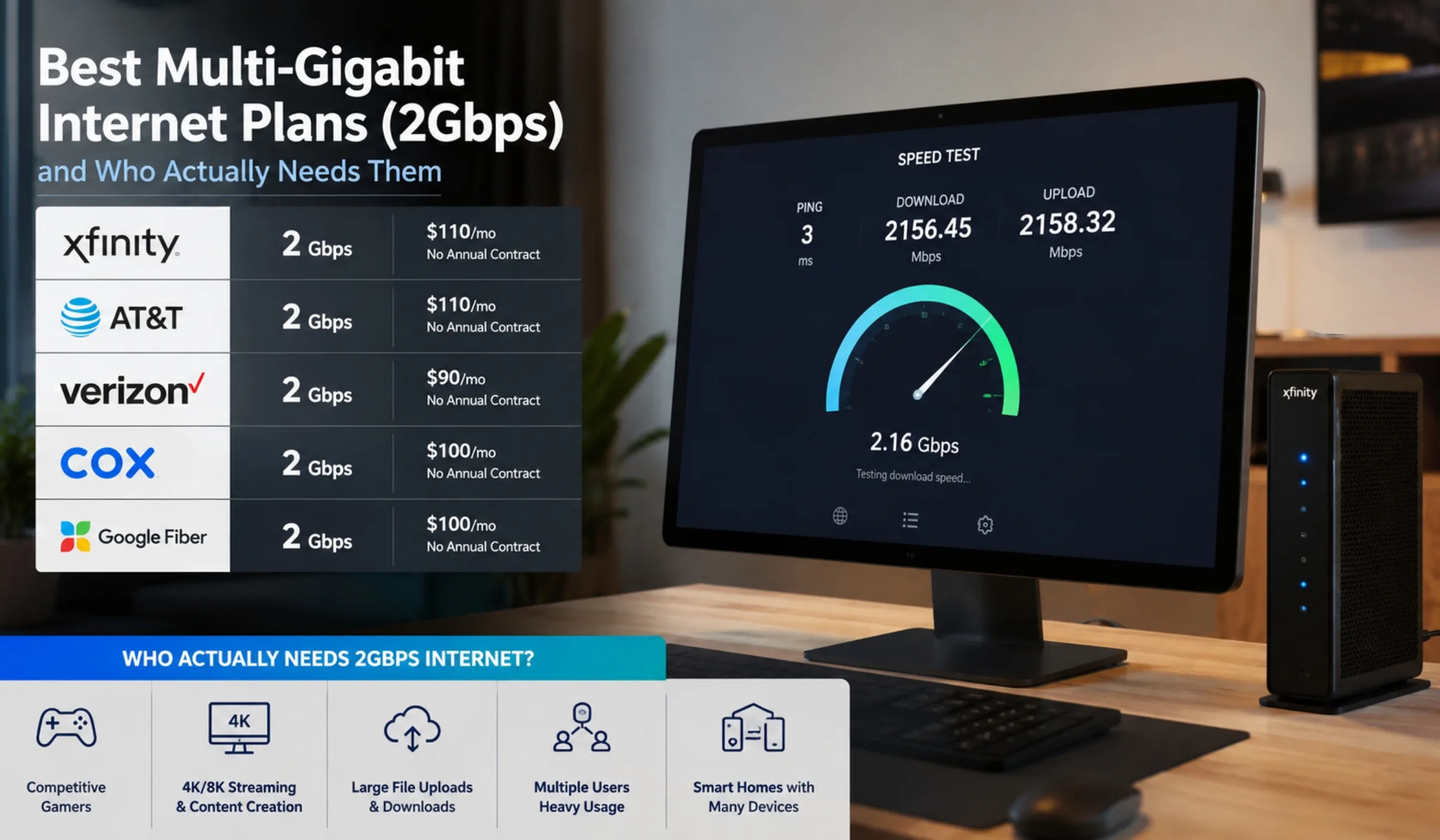
This is the question the providers would rather you didn’t ask. The honest answer is that most households will never use even a full 1 Gig, let alone 2 or 5. A single 4K stream needs about 25 Mbps. Even a busy home with four people streaming, gaming, and on video calls at once rarely pushes past a few hundred Mbps.
So who genuinely benefits? A few specific kinds of homes:
You’ll probably notice the difference if…
- You have a big, busy household. Ten-plus devices all active at once — multiple 4K TVs, gaming consoles, smart-home gear, security cameras, and several people working from home — can start to benefit from the extra headroom.
- You upload huge files regularly. Video editors, photographers, 3D artists, and content creators who push large 4K/8K projects to the cloud are the clearest winners, because fiber’s fast upload is where multi-gig really shines.
- You back up massive amounts of data. If you run a home NAS or server and sync terabytes to cloud storage, faster uploads turn an overnight job into a coffee break.
- You’re future-proofing a connected home. If the price gap is small and you plan to stay put for years, paying a little more now can save a re-up later.
You almost certainly don’t need it if…
- You mostly stream, browse, shop, and take video calls — a 300–500 Mbps plan handles all of that with room to spare.
- You live alone or with one other person.
- You connect mostly over Wi-Fi (more on why that matters below).
Here’s the reality that trips people up. A single device usually can’t use 2Gbps+ on its own. Most laptops, phones, and Wi-Fi routers cap out at 1 Gbps — some at 2.5 Gbps with newer Wi-Fi 7. To actually see multi-gig speeds, you need a 2.5G or 10G Ethernet port and a wired connection, or top-tier Wi-Fi 7 gear. The real benefit of multi-gig is spreading that big pipe across many devices at once, not making one laptop faster. If your equipment caps at 1 Gbps, paying for 5 Gig won’t change anything.
How Much Speed Do You Really Need?
Before you commit to multi-gig, it helps to see how little speed everyday activities actually use. These numbers are per activity, so you can add them up for your household.
| Activity | Speed Needed | Notes |
|---|---|---|
| Browsing & email | 5–10 Mbps | Barely makes a dent |
| HD video streaming | 5–10 Mbps | Per stream |
| 4K streaming | ~25 Mbps | Per stream |
| Video calls (Zoom) | 10–25 Mbps | Per call |
| Online gaming | 10–25 Mbps | Low latency matters more than speed |
| Busy 4-person home | 200–500 Mbps | Everyone active at once |
| Heavy creator / NAS uploads | 1,000 Mbps+ | Where multi-gig earns its keep |
Look at that last column. Almost everything sits comfortably under 500 Mbps. The only row that truly calls for multi-gig is heavy, sustained uploading — which is exactly the niche these plans serve best.
How to Choose the Right Multi-Gig Plan
1. Confirm availability at your exact address
Multi-gig is still rolling out street by street. A provider can serve your city without serving your home, so always check your specific address before getting attached to a plan.
2. Match the speed to your devices, not the marketing
If most of your gear is Wi-Fi and caps at 1 Gbps, a 2 Gig plan is plenty — and 5 Gig would be wasted. Only step up if you’ll wire devices with 2.5G or 10G ports.
3. Watch the upload, not just the download
Fiber’s symmetrical speeds are the real reason to switch. If a plan brags about download speed but hides the upload, it’s probably cable — and the upload is likely a fraction of the headline number.
4. Read the after-promo price
Some providers (like Frontier and Optimum) raise rates after the first year. Others (Google Fiber, AT&T) lock your price. Know which one you’re signing up for.
✔ Verify the plan reaches your exact address ✔ Confirm it’s fiber if you want symmetric speeds ✔ Check whether your devices can use 2.5G/10G ✔ Ask about the price after the promo ends ✔ Confirm equipment and install fees ✔ Check for data caps (most fiber has none)
The Bottom Line
Multi-gigabit internet is real, it’s getting cheaper, and in a few markets it’s a genuine bargain. Frontier leads on value, Google Fiber on simplicity, and AT&T on availability — with Ziply, Verizon Fios, and Optimum filling in strong regional options.
But speed for its own sake isn’t an upgrade. Be honest about how you use the internet. If you’re a heavy uploader, run a packed smart home, or want to wire up serious gear, 2Gbps+ can be worth every dollar. If you mostly stream and browse, a good 500 Mbps fiber plan will serve you just as well for a lot less — and you can always step up later. The smartest move is to check what’s actually available at your address, then buy the speed your devices can really use.
Ready to check multi-gig plans in your area?
Call (855) 696-0156
Frequently Asked Questions
Multi-gig refers to any internet plan faster than 1 gigabit per second (1,000 Mbps). That includes 2 Gig, 5 Gig, 8 Gig, and beyond. A 1 Gig plan is fast, but it isn’t technically multi-gig. These plans almost always run over fiber, since fiber is the only widely available technology that can deliver these speeds with matching upload and download.
For most homes, no. A single 4K stream uses about 25 Mbps, and even a busy four-person household rarely needs more than 500 Mbps. Multi-gig makes the most sense if you have a very large household with many simultaneous heavy users, or if you regularly upload massive files — like video editors, photographers, and people running home servers. If you mainly stream, browse, and take video calls, a 300–500 Mbps plan will feel identical to a 5 Gig plan in daily use.
Because most single devices physically can’t. The Ethernet port on a typical laptop maxes out at 1 Gbps, and most Wi-Fi connections cap around 1–2 Gbps even on newer standards. Multi-gig speeds are designed to be shared across many devices at once, or used by a single device with a special 2.5G or 10G network port. To see anything above 1 Gbps on one machine, you need that faster port and a wired connection.
Frontier Fiber stands out for value, with a 2 Gig plan around $64.99/mo and the only 7 Gig residential tier from a major provider. Ziply Fiber offers the best raw price-per-Mbps in the Pacific Northwest. Google Fiber wins on simplicity and rock-steady pricing. The “best” choice really comes down to which of these is available at your address, since multi-gig coverage is still limited.
Cable providers using DOCSIS 4.0 are starting to offer multi-gig download speeds, and Xfinity’s top tier reaches into that range. But cable uploads remain far slower than downloads, and the top plans are pricey and often require contracts. Fiber gives you matching upload and download speeds, which is the main reason most multi-gig shoppers choose fiber over cable.
Probably not in the way you’d hope. Online gaming needs only 10–25 Mbps — what matters for gaming is low latency (ping) and a stable connection, not raw speed. Fiber’s low latency does help, but you get that benefit on a 1 Gig fiber plan just as much as on a 5 Gig one. Where multi-gig helps gamers is downloading huge game files faster and supporting a household full of other heavy users at the same time.
Almost never. The major fiber providers — Frontier, AT&T, Google Fiber, Verizon Fios, Ziply, and Optimum — all include unlimited data on their multi-gig plans with no overage charges or throttling. This is one of the genuine perks of fiber: you can use as much data as you want.
Last updated June 2026. All prices, speeds, plans, and availability are subject to change and vary significantly by address and market. Introductory rates may rise after a promotional period, and multi-gig tiers are available only in select areas. Please verify current offers, terms, and coverage directly with each provider before signing up. This guide is for informational purposes only and does not constitute financial advice.